Please note
This article is aimed at employees of shipping centers with which Digistore24 has partnered.
In this article, you'll discover what options there are for connecting Digistore24 to a shipping center.
When connecting Digistore24 to a shipping center, two streams of information are relevant:
- The shipping center retrieves shipping data from Digistore24:
- The data of the orders to be shipped (address, products).
- The information about in whose name an order is to be sent (vendor or Digistore24).
Please note
If an order is to be sent in the name of Digistore24, Digistore24 will provide a reseller ID, e.g. the ID of the German reseller Digistore24 GmbH (see https://www.digistore24.com/support/resellers).
- The shipping center stores shipping data in Digistore24:
- The shipping status of an order and, if applicable, the tracking data.
- Information on whether the shipment was sent on behalf of Digistore24.
Please note
If an order is to be sent in the name of Digistore24, the shipping center will provide a code to store this information (see https://www.digistore24.com/support/fulfillment_centers).
There are three ways to connect Digistore24 to a shipping center:
Account access for shipping center: Manual retrieval and storage of shipping data
Requirements
- You need a Digistore24 account.
- The vendor has set up account access for your Digistore24 account with the authorization for shipping employees.
If the requirements are met, you can access the vendor's Digistore24 account.
Then go to the vendor's Digistore24 account and open the Reports > Shipping menu. There you can view the orders including details and export them as a CSV file. You can also mark orders as shipped and specify the name in which the order was shipped.
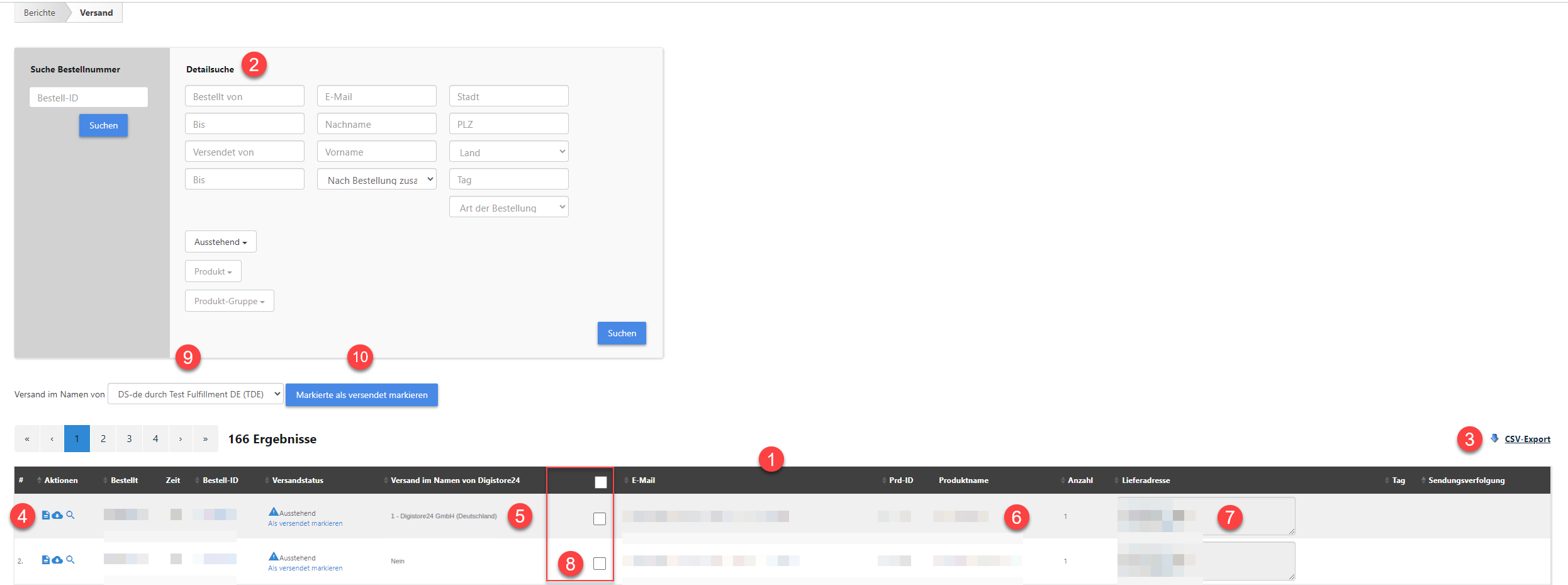
- Here you can see an overview of the orders.
- You can filter by order, e.g. by shipping status Outstanding.
- You can export the order overview as a CSV file.
- Details are displayed for each order.
- You can see whether an order should be sent on behalf of Digistore24.
Please note
If an order is to be sent in the name of Digistore24, you will see the reseller and their ID (see https://www.digistore24.com/support/resellers). - You can see information about the products in an order.
- You can see the delivery address of an order.
- You can select all or individual orders.
- In this field, you can select the name in which an order is sent.
Please note
If you choose to have the order shipped on behalf of Digistore24, the code of your shipping center will automatically be stored (see https://www.digistore24.com/support/fulfillment_centers). - Use this button to mark selected orders as shipped.
Please note
The Digistore24 API can also be used to store the tracking data (shipment tracking) of an order.
Connect shipping center via API
The Digistore24 API enables the automated exchange of shipping data (see Delivery workflow).
Shipping center retrieves shipping data from Digistore24
The function listDeliveries() is used to transfer the orders to be shipped, including relevant details, from Digistore24 to the shipping center.
The field is_shippment_by_reseller_id specifies whether the shipment should be made in the name of Digistore24:
- If the field is empty, the shipment should be made in the name of the vendor.
- If an ID is provided, the shipment should be made in the name of the Digistore24 reseller with the corresponding ID.
You can find an overview of the resellers and their IDs here: https://www.digistore24.com/support/resellers
Shipping center stores shipping data in Digistore24
The function updateDelivery() is used to transfer shipping status and tracking data from the shipping center to Digistore24.
An important parameter of the updateDelivery() function is: is_shipped_by_reseller_from=CODE
Use this parameter if the field is_shippment_by_reseller_id has a value – i.e. the ID of a Digistore24 reseller. Enter the “CODE” of your shipping center (see https://www.digistore24.com/support/fulfillment_centers).
Summary: Sending an order on behalf of Digistore24
-
is_shippment_by_reseller_idis set by Digistore24 and has IDs from https://www.digistore24.com/support/resellers - if the order has to be sent in the name of Digistore24. -
is_shipped_by_reseller_fromis set by the shipping center and has codes from https://www.digistore24.com/support/fulfillment_centers - if the order was sent in the name of Digistore24.
Connect shipping center via IPN
Shipping data can be transferred to the shipping center via instant payment notification (IPN). When an order is placed, the data is automatically transferred to the shipping center's system where it can be processed further.
If you have a larger customer base that works or would like to work with Digistore24, please contact us. We will then discuss the possibility of creating your own IPN integration for your shipping center.